


How to Add a Trade That Isn't in Your DEGIRO CSV Yet
A DEGIRO CSV export is a snapshot: a trade you make tomorrow is not in it. Instead of exporting a new CSV after every trade, you can add the buy or sell to Invest Tracker yourself with Add Transaction. Type in the details, or paste DEGIRO's confirmation email and let AI fill them in. This requires a free account, so your trades are saved.
Step-by-step
Step 1: Log in
Create a free account or log in on Invest Tracker. Your uploaded CSV and the trades you add are saved to your account, so you see the same portfolio on every device.
Step 2: Click Add Transaction
Scroll to the Transactions section at the bottom of the dashboard and click Add Transaction. Choose Buy or Sell and search the stock or ETF by its ticker symbol or name.
Step 3: Enter the details
Fill in the quantity and either the price per share or the total price in euros, the trading costs, and the date and time of the trade. The total at the bottom shows what you paid or received.
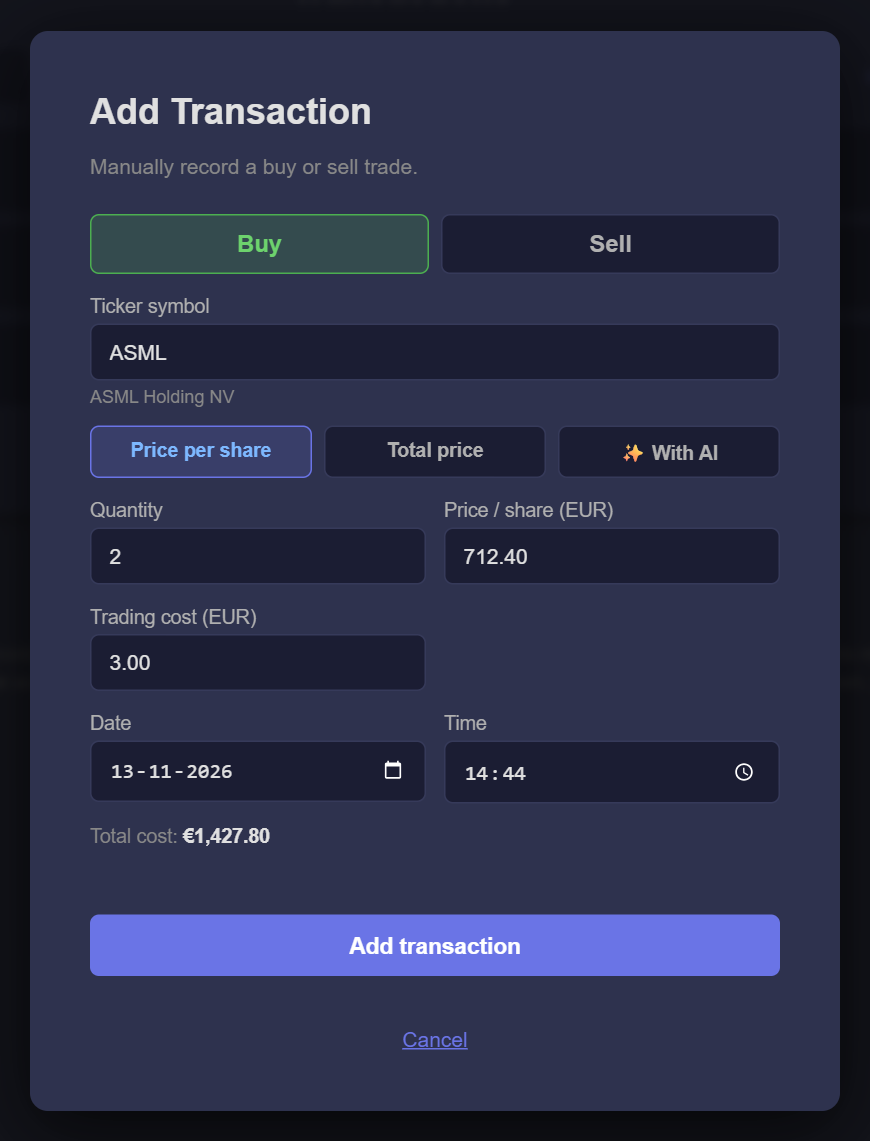
Or: let AI read your confirmation email
Choose ✨ With AI, paste the order confirmation email that DEGIRO sent you and click Analyse. The fields are filled in for you; check them before you save. The pasted text is only used to read the trade details and is not stored.
What happens next
- The trade counts in your holdings, profit and charts straight away.
- It appears in Transactions with a trash icon, so you can delete it if you made a mistake.
- No double counting. When you later upload a newer DEGIRO CSV, trades you added by hand that fall on or before the last date in that CSV are removed automatically, because the CSV already contains them.
Keep your portfolio up to date
Free account, no bank details required. All you need is an email address.
Open Invest TrackerFrequently asked
Can I add a trade without an account?
No. Trades you add are saved to your account; without one, Invest Tracker only uses the CSV you upload, which stays in your browser.
The stock is priced in dollars. Which price do I enter?
Enter the amount in euros, as shown on DEGIRO's confirmation. The easiest option is the total price in euros, which already includes the exchange rate DEGIRO used.
Can I add dividends by hand?
No, you can add buys and sells. Dividends come in with your next CSV upload.
Invest Tracker is an independent tool and is not affiliated with DEGIRO. Figures are calculated from your own data and are for information only, not financial advice.