


How to See How Much You Paid in DEGIRO Fees
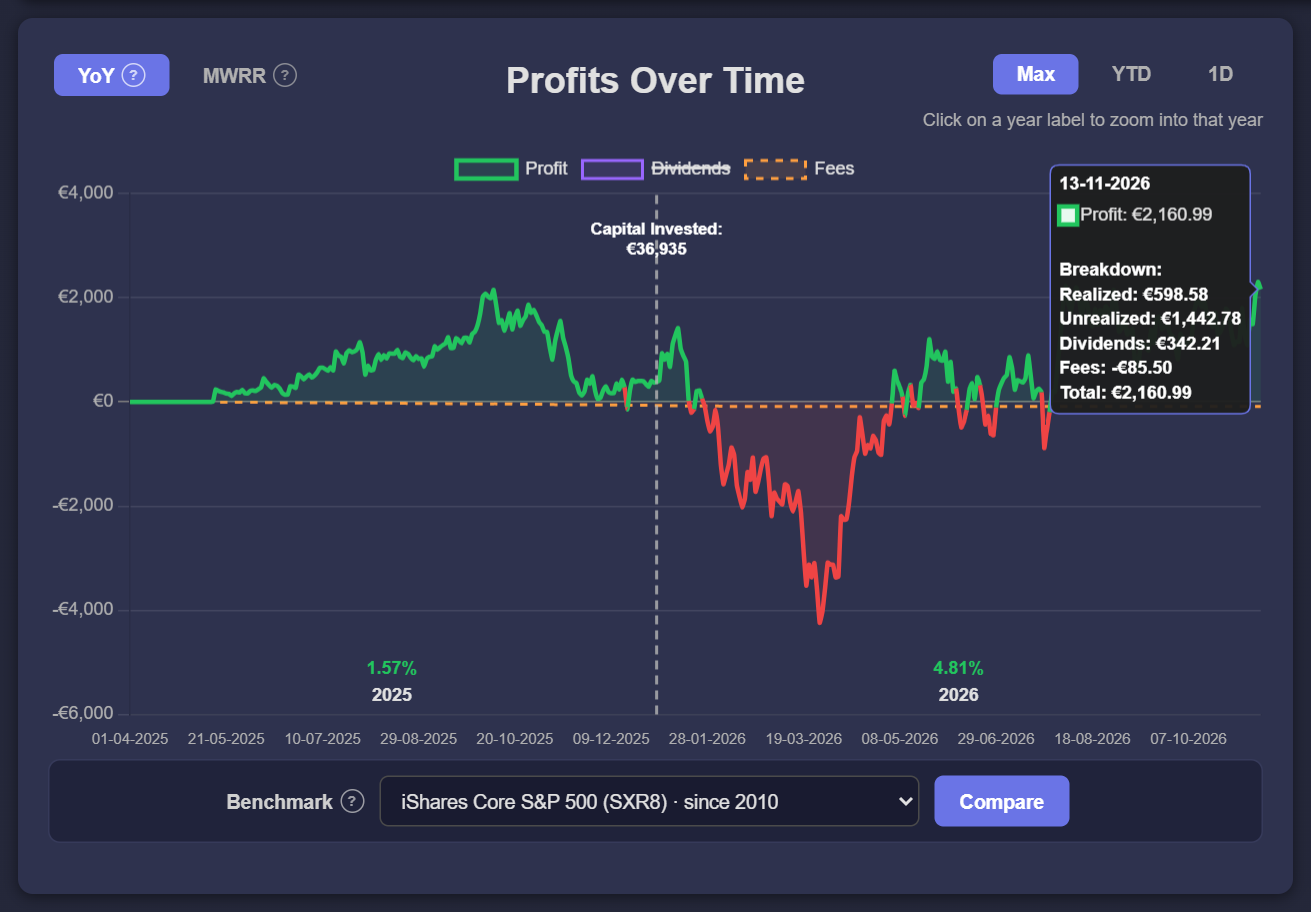
DEGIRO records every fee in your account statement, but spread over hundreds of lines between your trades and dividends. To see the total, export your account statement as a CSV and upload it to Invest Tracker. Turn on the Fees line in the Profits Over Time chart and you see how much you paid in costs, day by day, since your very first trade.
Low fees are one of the main reasons people choose DEGIRO, but small costs add up over the years. Knowing your real total helps you decide whether a strategy with many small orders is worth it.
Which DEGIRO costs are in your CSV
- Transaction costs: the fee per order, listed as "DEGIRO Transactiekosten en/of kosten van derden" (transaction costs and/or third-party costs).
- Exchange connection fees ("Aansluitingskosten"): a yearly fee for each foreign exchange you trade on, for example Nasdaq, Xetra or the London Stock Exchange.
- Financial transaction taxes, such as the French tax on buying French shares ("Transactiebelasting Frankrijk").
- ADR/GDR fees that depositary banks charge on some foreign shares.
- Interest on your cash balance (flatex interest), and price changes of the money market fund DEGIRO used for cash in the past. Both can also be positive; Invest Tracker then counts them as income that lowers your total costs.
Two costs are not listed as a separate fee. Currency conversion (AutoFX) costs are part of the conversion itself, so they are already included in the euro amounts of your trades. Dividend tax that is withheld abroad is deducted from your dividends, not counted as a fee.
Step-by-step
Step 1: Export your DEGIRO CSV
On the DEGIRO desktop website, open Inbox → Account statement, set the start date to before your first transaction and export to CSV. Full walkthrough: How to Export Your Trades from DEGIRO.
Step 2: Upload it to Invest Tracker
Open Invest Tracker and drop in the CSV. Every cost line in the file is recognised automatically and converted to euros.
Step 3: Turn on the Fees line
In the Profits Over Time chart, click Fees in the legend above the chart. It is hidden by default to keep the chart calm. A dashed orange line appears that shows your cumulative costs as a negative amount. Hover over any day to see the breakdown of your profit on that day: realized, unrealized, dividends, fees and the total.
How to read the numbers
Your total profit in Invest Tracker is already after fees: realized profit plus unrealized profit plus dividends, minus all costs. The Fees line shows how big that last part is. A useful check is to compare your fees with your dividends: if your costs are close to what you receive in dividends, you are paying away a large part of your income.
Steps in the line tell you where the costs come from. Small, frequent steps are transaction costs; a single step around the start of the year is usually the exchange connection fee.
Ways to keep your costs down
- Fewer, larger orders. A fixed fee per order weighs much less on a large order than on a small one.
- Fewer exchanges. Every foreign exchange you trade on can add a yearly connection fee, even if you only bought once.
- Watch transaction taxes. Some countries charge a tax on buying their shares, on top of DEGIRO's own fee.
- Check the current fee schedule. DEGIRO changes its prices from time to time, so look up the latest fees on its website before you change your strategy.
See your total DEGIRO costs
Free and no account required. Without an account, your data stays in your browser.
Upload your DEGIRO CSVFrequently asked
Why is my fee total different from DEGIRO's annual report?
Invest Tracker counts the cost lines in the period of your export, from your first trade until today. DEGIRO's annual report covers one calendar year, and currency conversion costs are not a separate line in the CSV. Make sure your export starts before your first transaction.
Are fees included in my profit and loss?
Yes. The profit figures in Invest Tracker are net of every cost line in your CSV, so the Fees line is already taken into account in your total profit.
Invest Tracker is an independent tool and is not affiliated with DEGIRO. Figures are calculated from your own CSV export, may differ from DEGIRO's own reporting, and are for information only, not financial advice.