


How to Find Your DEGIRO Portfolio Value on a Specific Date
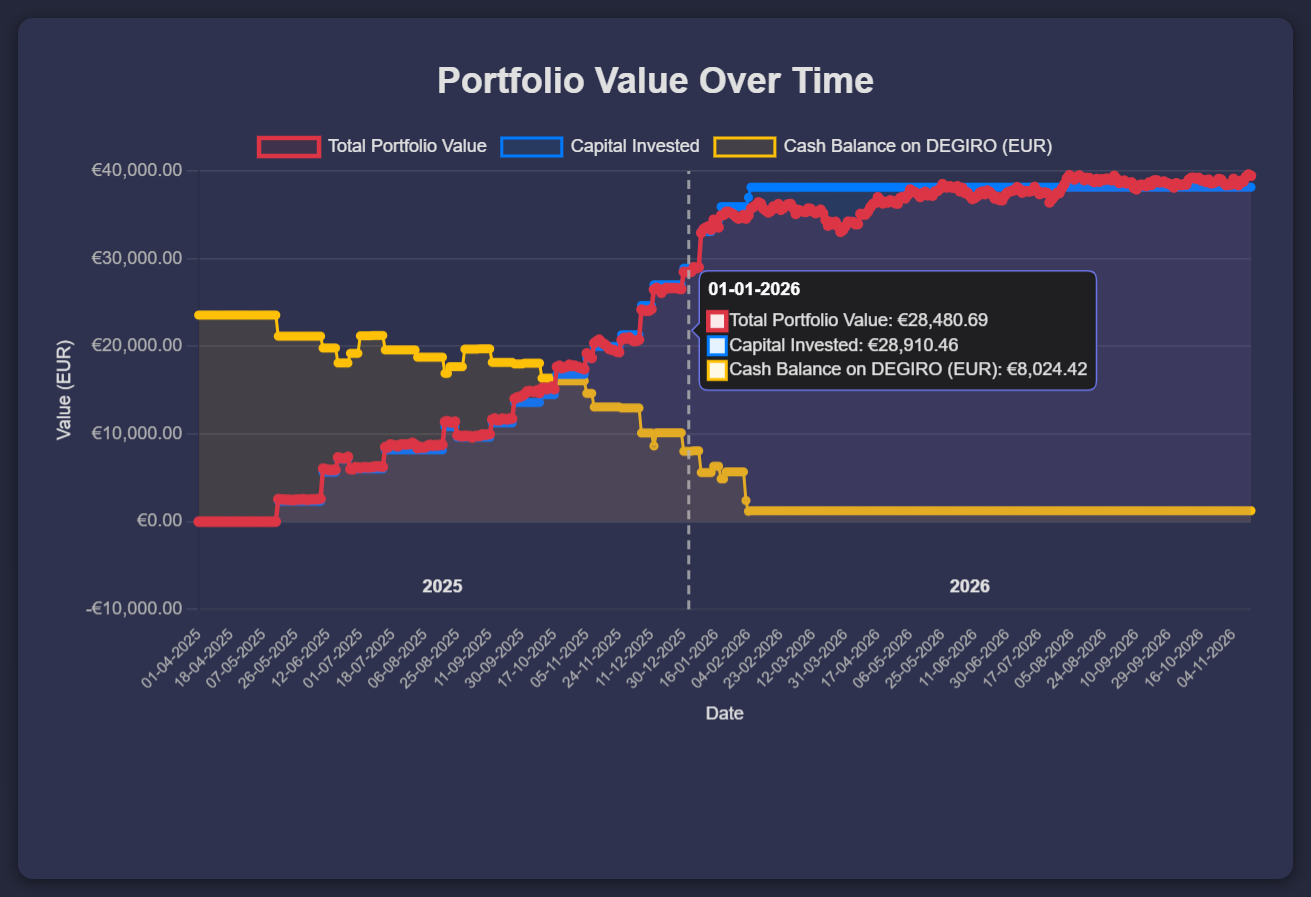
To see what your DEGIRO portfolio was worth on a specific date, upload your DEGIRO CSV to Invest Tracker, open the Portfolio Value Over Time chart and hover over that date. The tooltip shows the value of your holdings, the capital you had invested and the cash on your DEGIRO account on that day.
A value on a fixed date is useful for an annual review ("what was my portfolio worth on 1 January?"), for comparing years, or as a check next to the figures you need for your tax return. Several countries use the value on a reference date, such as 1 January in the Dutch box 3 system.
Step-by-step
Step 1: Export and upload your DEGIRO CSV
Export your account statement as a CSV with a start date before your first transaction (how to export it) and drop it into Invest Tracker. The full history is needed to rebuild your positions on every date.
Step 2: Open the Portfolio Value Over Time chart
Below the Profits Over Time chart you find Portfolio Value Over Time and Portfolio Allocation. If they are hidden, click the eye button to show them.
Step 3: Hover over the date
Move your mouse over the chart until the tooltip shows the date you need, for example 01-01-2026. You see three values for that day:
- Total Portfolio Value: the market value of your shares and ETFs.
- Capital Invested: the money you had put into those positions.
- Cash Balance on DEGIRO: the euros on your DEGIRO account.
Your total assets at DEGIRO on that date are the portfolio value plus the cash balance.
Good to know
- Closing prices. The value is based on daily closing prices. On 1 January the stock markets are closed, so you see the value at the last closing prices of the previous year.
- In euros. Foreign shares are converted to euros with the exchange rate of that day.
- Small differences are normal. DEGIRO may use other price sources and exchange rates, so its own report can differ by a few euros.
Using it for your tax return
For your tax return, use the annual report that DEGIRO provides, because that is the official overview from your broker. Invest Tracker is handy to check those figures, to see how your value developed during the year, or to look up a date that is not in the report. This guide is not tax advice; check the rules of your own tax authority.
Look up your portfolio value
Free and no account required. Without an account, your data stays in your browser.
Upload your DEGIRO CSVFrequently asked
Why does the value on 1 January equal the value on 31 December?
Because no trading happens on 1 January, the prices are the same as at the last close of the year. That is also why both dates usually give the same result.
Can I see the value on a date in the middle of a year?
Yes. Every day in the chart has its own value, so you can hover over any date since your first transaction.
Invest Tracker is an independent tool and is not affiliated with DEGIRO. Values are calculated from your own CSV export and market data, may differ from DEGIRO's own reporting, and are for information only, not financial or tax advice.